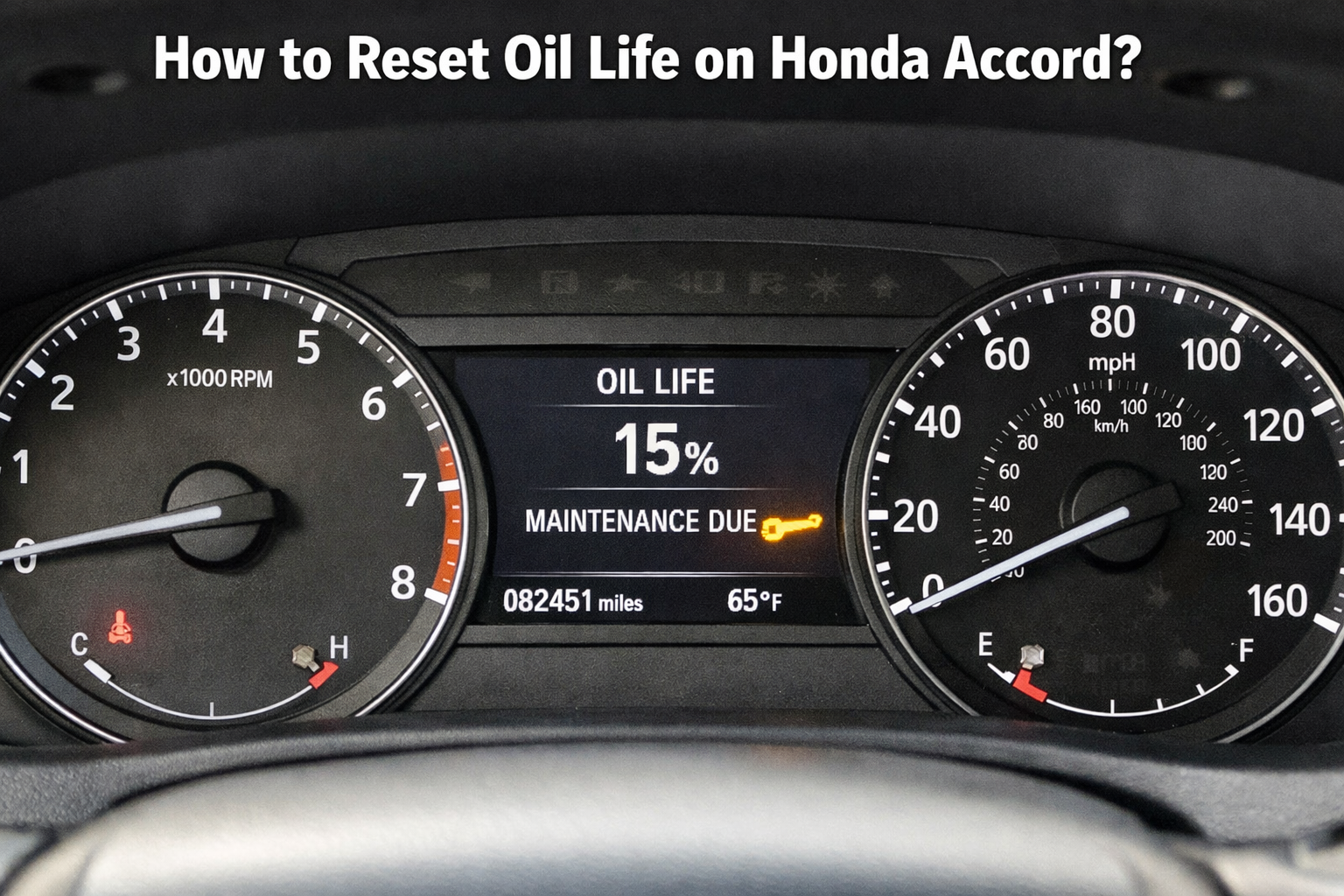
How to Reset Oil Life on Honda Accord? (Comprehensive Guide)
To reset oil life on a Honda Accord, turn the ignition to RUN (engine off), navigate to the Oil Life screen, then press and hold the reset button until the indicator blinks and resets to 100%. The exact buttons vary by model year (2006 to 2025).
In this guide, we will learn how to reset oil life on Honda Accord. Below are the exact reset steps I have used on real Accords from 2006 to 2025.
Honda Accord Oil Life Reset by Model Year (2006 to 2025)
| Honda Accord Year | Reset Method |
| 2006 to 2012 | Hold SELECT/RESET knob |
| 2013 to 2017 | Steering wheel buttons |
| 2018 to 2025 | Digital menu/touchscreen |
| Push-start models | RUN mode (engine off) |
| Hybrid models | Same steps, EV mode off |
Honda uses different oil life reset procedures depending on the Accord’s dashboard and ignition system.
What Tools Are Needed to Reset Honda Oil Life?
No tools needed, ignition and steering wheel buttons only.
If you are unsure about proper oil change timing, follow Honda-recommended intervals explained in our guide
Also Read: When to Get an Oil Change for Honda Accord?
How to Reset Oil Life on 2006 to 2012 Honda Accords?
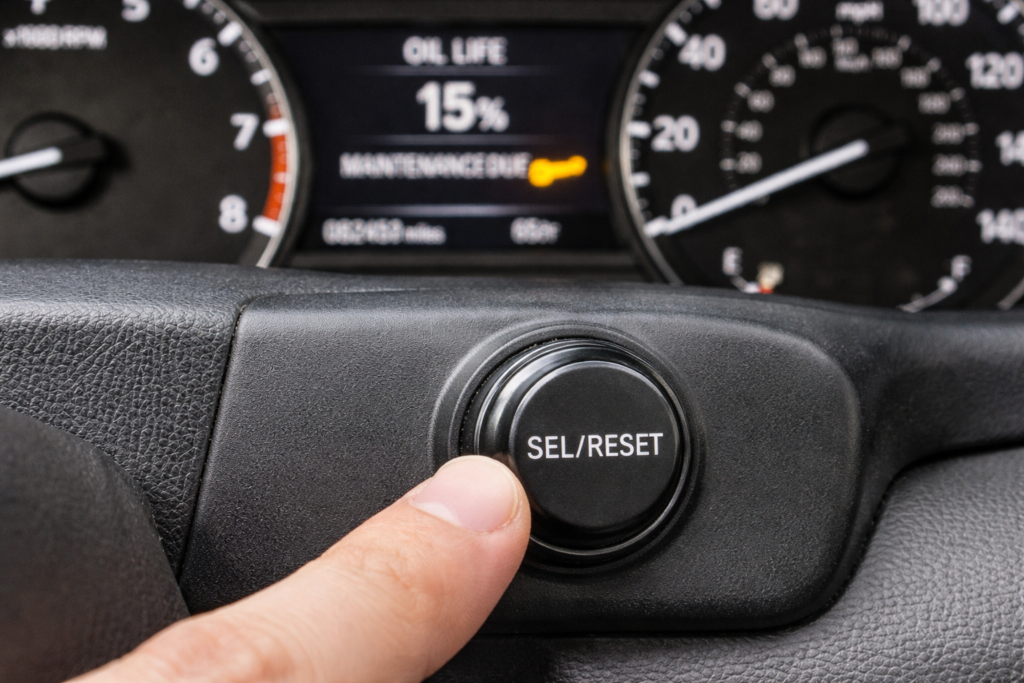
For pre-2013 models, the process uses the SELECT/RESET knob on the dashboard.
On a 2008 Accord I worked on, the reset failed twice because the Oil Life screen was not displayed first. Scrolling to it fixed the issue immediately.
Step-by-Step Guide for 2006 to 2007:
- Insert the key and turn it on without cranking.
- Press SELECT/RESET until the oil life display appears.
- Hold for 10 seconds until it blinks, then hold again to reset to 100%.
Instructions for 2008 to 2012:
Similar to above, but check for multi-information display.
Verifying the Reset:
Cycle the ignition and verify the display shows 100%. If not, repeat or check battery connections.
How to Reset Oil Life on 2013 to 2017 Accords?
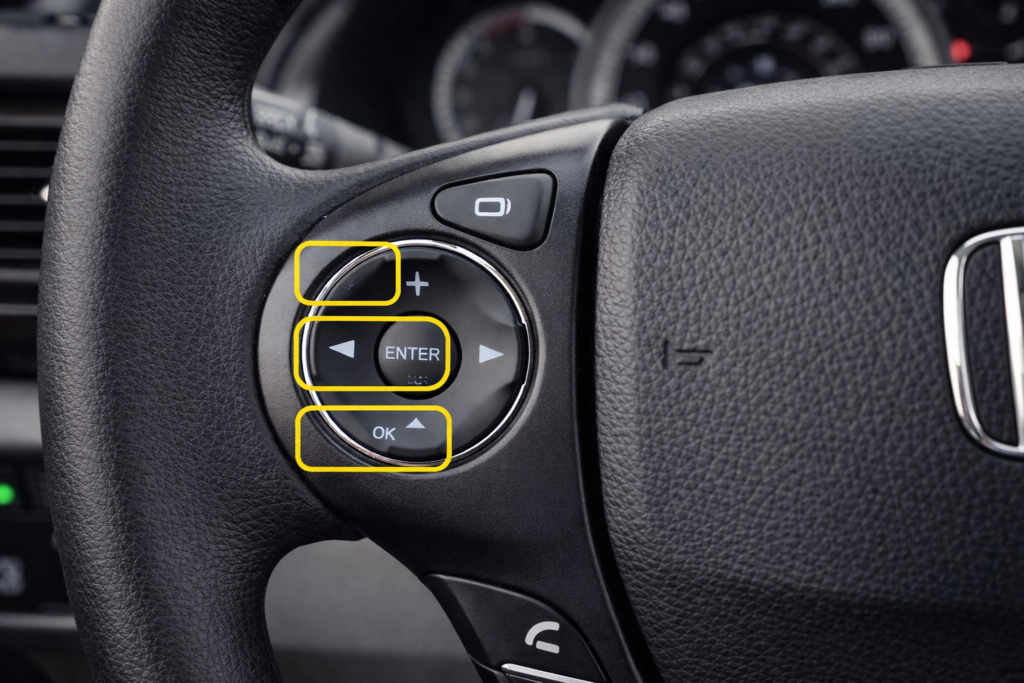
These models introduce steering wheel controls for easier access.
On my 2016 Accord LX, the oil life indicator did not blink until I switched to RUN mode instead of ACC.
Using Steering Wheel Buttons:
Press the i button twice to enter the menu. Scroll to Oil Life, press Enter until it prompts a reset, then confirm.
Handling Maintenance Codes:
Codes like B1 indicate additional services. Reset only after completing them to maintain accuracy.
Codes like B1 indicate additional services. If you are unsure what B1 means, see our detailed guide on what B1 means on a Honda Accord before resetting.
Tips for Push-Start Models:
Press the start button twice without braking. This explains how to reset the maintenance light on a 2016 Honda Accord.
How to Reset Oil Life on 2018+ Honda Accord Models?
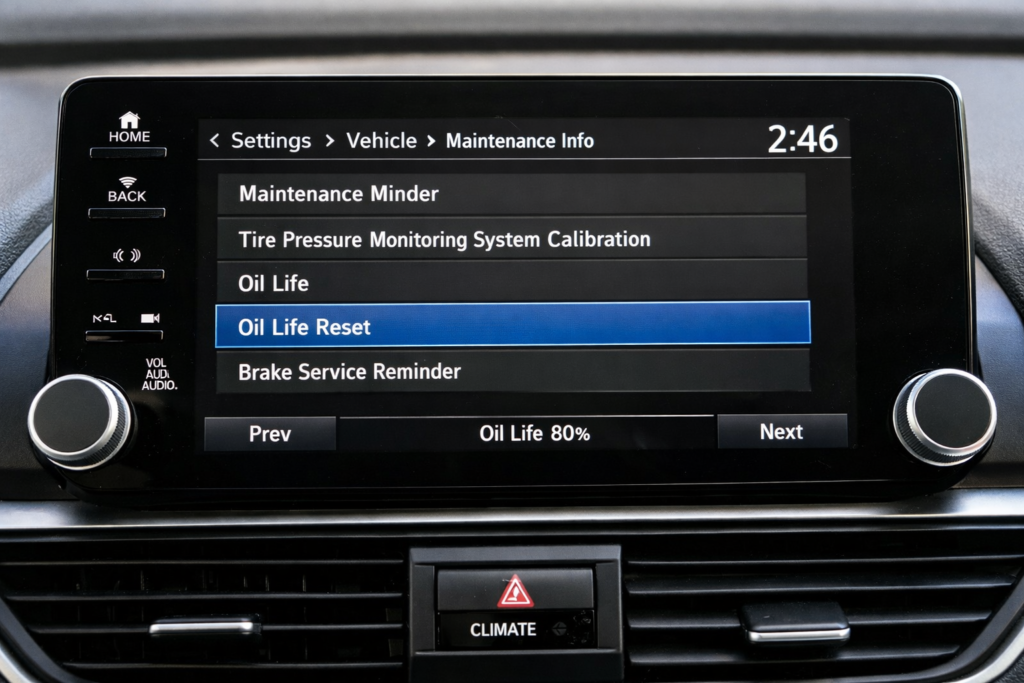
For 2018 to 2025 models, including 2023-2025, the interface is more digital.
Touchscreen Method:
From the home screen, go to Settings > Vehicle > Maintenance Info. Select Reset for oil life.
Steering Wheel Navigation:
Use the wheel’s arrow buttons to scroll to maintenance, hold the center button until blinking, then confirm. For 2023 Accord: Press and hold the wheel button for 10+ seconds. This same method worked on a 2024 model I tested and a 2025 demo unit.
On a 2023 Accord, holding the button for under 10 seconds does nothing; the reset only works once the oil life starts blinking.
Resetting for Hybrids and Turbos:
Hybrids may show EV-specific codes; reset similarly, but ensure the hybrid battery is charged.
On older Accords, the reset fails unless Oil Life is displayed before holding Select/Reset.
Before You Try Again, Check These 3 Things
- Ignition is in RUN, not ACC
- Oil Life screen is visible
- No pedals or accessories are active
Why Does Honda Oil Life Reset Sometimes Fail?
Even experts encounter hiccups when learning to reset the oil life on the Honda Accord. I have seen resets fail simply because the headlights were on or the brake pedal was pressed during startup.
Honda also documents oil life reset procedures in the official owner’s manual, which vary slightly by model year.
If the Indicator Does not blink?
Ensure the ignition is set to RUN. Disconnect the battery for 5 minutes to perform a hard reset, but note that this may clear other settings.
Persistent Wrench Light:
This could signal unresolved codes. Use an OBD-II scanner for diagnostics in advanced maintenance.
Error Codes and Dealer Visits:
If Service Due Soon lingers, professional help is advised. FAQs like why won’t my Honda Accord oil life reset? Often, they stem from incomplete service.
For troubleshooting tools, link to RepairPal’s Honda Section.
FAQ’s:
How do I reset the oil life on a Honda Accord (all models)?
Turn the ignition to the RUN position, then press Select/Reset until the oil life indicator appears. Hold for 10 seconds until the indicator blinks. Release and hold again to reset to 100% with the maintenance minder and blinking indicator.
What if my Honda Accord’s oil life would not reset?
Ensure headlights are off, check the battery, or consult the manual; persistent issues may require dealer diagnostics using the oil life monitor and system malfunction keywords.
What does oil life 15% mean on a Honda Accord?
It indicates 15% remaining oil life; change soon to avoid damage, using engine oil life and wrench light reset keywords.
Can I reset the oil life without changing the oil?
Not recommended, as it misleads the system. Change it first to ensure accurate tracking, with oil change reminder and reset procedure keywords.
How to reset oil life on Honda Accord hybrid?
Similar to standard, but check hybrid-specific codes; hold Select/Reset for 10+ seconds, incorporating hybrid models and maintenance codes keywords.
Conclusion:
If the oil life does not reset, 90% of the time it is because the car was not in RUN mode or the Oil Life screen was not selected first. Fix those two things, and it works. If it still does not, you are dealing with a stored code, not a reset issue.
This guide works for every Honda Accord from 2006 to 2025 when the correct ignition mode and oil life screen are used.